注意
转到末尾 下载完整的示例代码。
plot_timeline
- optuna.visualization.matplotlib.plot_timeline(study, n_recent_trials=None)[源代码]
绘制 study 的时间线。
另请参阅
请参阅
optuna.visualization.plot_timeline()获取示例。- 参数:
- 返回:
一个
plotly.graph_objects.Figure对象。- 引发:
ValueError – 如果
n_recent_trials为 0 或负数。- 返回类型:
注意
在 v3.2.0 中添加为实验性功能。接口可能在更高版本中更改,恕不另行通知。请参阅 https://github.com/optuna/optuna/releases/tag/v3.2.0。
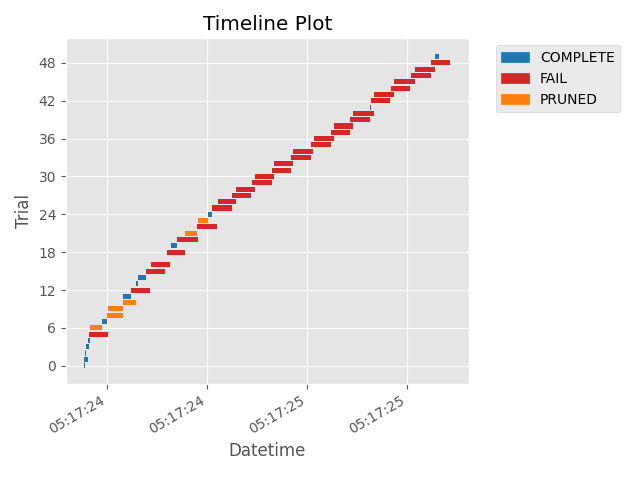
以下代码片段展示了如何绘制 study 的时间线。
/home/docs/checkouts/readthedocs.org/user_builds/optuna/checkouts/stable/docs/visualization_matplotlib_examples/optuna.visualization.matplotlib.timeline.py:29: ExperimentalWarning:

optuna.visualization.matplotlib._timeline.plot_timeline is experimental (supported from v3.2.0). The interface can change in the future.


<Axes: title={'center': 'Timeline Plot'}, xlabel='Datetime', ylabel='Trial'>
import time
import optuna


def objective(trial):
    x = trial.suggest_float("x", 0, 1)
    time.sleep(x * 0.1)
    if x > 0.8:
        raise ValueError()
    if x > 0.4:
        raise optuna.TrialPruned()
    return x**2


study = optuna.create_study(direction="minimize")
study.optimize(objective, n_trials=50, n_jobs=2, catch=(ValueError,))

optuna.visualization.matplotlib.plot_timeline(study)
脚本总运行时间: (0 分 1.702 秒)