注意
跳转到末尾 下载完整的示例代码。
plot_rank
- optuna.visualization.matplotlib.plot_rank(study, params=None, *, target=None, target_name='Objective Value')[源代码]
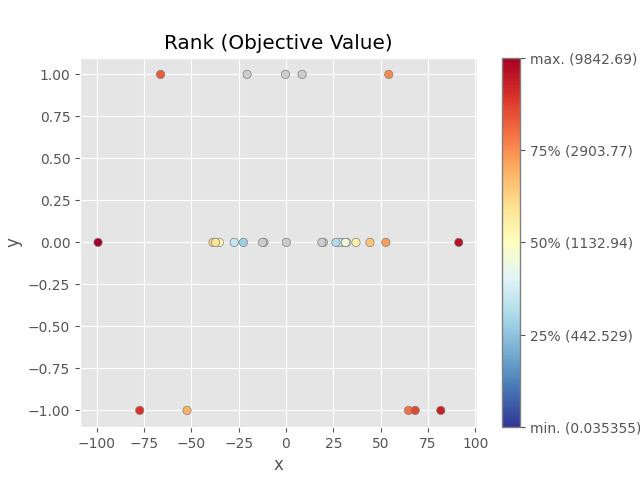
将参数关系绘制为散点图,颜色指示目标值的排名。
请注意,缺少指定参数的试验不会被绘制。
另请参阅
有关示例,请参阅
optuna.visualization.plot_rank()。- 参数:
- 返回:
一个
matplotlib.axes.Axes对象。- 返回类型:
注意
在 v3.2.0 中添加为实验性功能。接口可能在更高版本中更改,恕不另行通知。请参阅 https://github.com/optuna/optuna/releases/tag/v3.2.0。
以下代码片段展示了如何将参数关系绘制为排名图。
/home/docs/checkouts/readthedocs.org/user_builds/optuna/envs/stable/lib/python3.12/site-packages/optuna/_experimental.py:32: ExperimentalWarning:

Argument ``constraints_func`` is an experimental feature. The interface can change in the future.

/home/docs/checkouts/readthedocs.org/user_builds/optuna/checkouts/stable/docs/visualization_matplotlib_examples/optuna.visualization.matplotlib.rank.py:33: ExperimentalWarning:

optuna.visualization.matplotlib._rank.plot_rank is experimental (supported from v3.2.0). The interface can change in the future.


<Axes: title={'center': 'Rank (Objective Value)'}, xlabel='x', ylabel='y'>
import optuna


def objective(trial):
    x = trial.suggest_float("x", -100, 100)
    y = trial.suggest_categorical("y", [-1, 0, 1])

    c0 = 400 - (x + y) ** 2
    trial.set_user_attr("constraint", [c0])

    return x**2 + y


def constraints(trial):
    return trial.user_attrs["constraint"]


sampler = optuna.samplers.TPESampler(seed=10, constraints_func=constraints)
study = optuna.create_study(sampler=sampler)
study.optimize(objective, n_trials=30)

optuna.visualization.matplotlib.plot_rank(study, params=["x", "y"])
脚本总运行时间: (0 分钟 0.332 秒)