注意
转到末尾 下载完整示例代码。
plot_hypervolume_history
- optuna.visualization.matplotlib.plot_hypervolume_history(study, reference_point)[source]
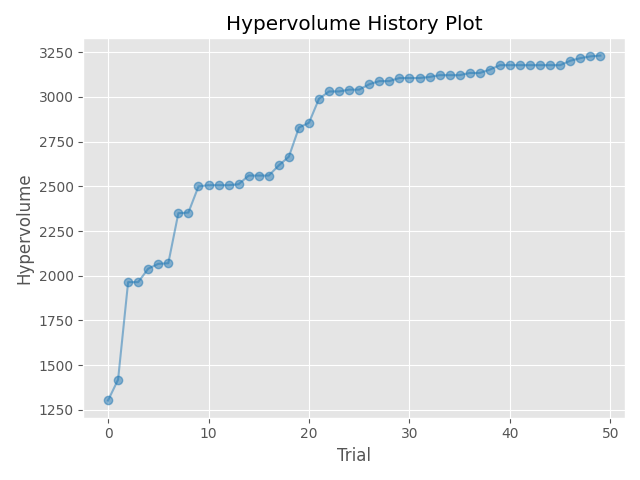
使用 Matplotlib 绘制研究中所有试验的超体积历史记录。
注意
您需要使用
plt.tight_layout()或plt.savefig(IMAGE_NAME, bbox_inches='tight')自己调整绘图大小。- 参数:
- 返回:
一个
matplotlib.axes.Axes对象。- 返回类型:
注意
于 v3.3.0 作为实验性功能添加。界面可能会在较新版本中更改,恕不另行通知。请参阅 https://github.com/optuna/optuna/releases/tag/v3.3.0。
以下代码片段展示了如何绘制优化历史记录。
/home/docs/checkouts/readthedocs.org/user_builds/optuna/checkouts/stable/docs/visualization_matplotlib_examples/optuna.visualization.matplotlib.hypervolume_history.py:29: ExperimentalWarning:

optuna.visualization.matplotlib._hypervolume_history.plot_hypervolume_history is experimental (supported from v3.3.0). The interface can change in the future.
import optuna
import matplotlib.pyplot as plt


def objective(trial):
    x = trial.suggest_float("x", 0, 5)
    y = trial.suggest_float("y", 0, 3)

    v0 = 4 * x ** 2 + 4 * y ** 2
    v1 = (x - 5) ** 2 + (y - 5) ** 2
    return v0, v1


study = optuna.create_study(directions=["minimize", "minimize"])
study.optimize(objective, n_trials=50)

reference_point=[100, 50]
optuna.visualization.matplotlib.plot_hypervolume_history(study, reference_point)
plt.tight_layout()
脚本总运行时间: (0 分钟 0.247 秒)